The RCA meaning in BPO and in-house customer service is the same: RCA stands for root cause analysis, finding the underlying reason a support problem keeps happening, so you fix the source instead of the symptom. For support teams, that means reading QA results for patterns across agents, tickets and processes, then deciding whether the fix is coaching, a process change or a product change.
In short
- RCA means root cause analysis: finding why a support problem keeps happening, not only who made the mistake.
- Start from QA data such as your Internal Quality Score, not a random pile of tickets.
- The same mistake across several agents usually points to a process gap, not a coaching need.
- Simple methods like the 3 Whys work for most support teams; fishbone diagrams and fault tree analysis help with bigger problems.
- The output of RCA is an action: training, a coaching session, a process fix or a product fix.
Analyzing the Internal Quality Score (IQS) of your support efforts wouldn’t be complete without digging deeper into the quality standards agents don’t meet, the type of tickets most often impacted and the mistakes that keep happening. IQS is the share of quality points your team earns when conversations are scored against your own scorecard; our guide to the internal quality score explains the formula.
Understanding the main problem behind an agent’s performance helps you prevent similar issues from happening again, give consistent feedback, organize coaching sessions and improve agent engagement and motivation. When you want this done across every conversation rather than a sample, support insights built on QA data are where root causes become visible.
What is root cause analysis in customer service?
Root cause analysis in customer service is a method for looking closely at your agents’ tickets and the way they interact with customers to identify the underlying reason for common or vital issues. It explains why an agent’s work falls short of expectations, or why customers complain about unreliable interactions, so the same problem does not return.
These underlying problems are the root cause. If they are corrected, you can prevent similar problems from happening again.
But the trick is: you can only start the root cause analysis after you have the data. Simply going through tickets won’t be enough, because tickets are very individual and need to meet exact quality standards. Instead, you rely on your company’s own quality standards to get the IQS results.
So you first need to complete multiple ticket ratings and gather the data, both at IQS level and by looking at exactly what each agent achieved or missed. This tells you which tickets you can use to start your root cause analysis.
Why is root cause analysis useful for support teams?
Root cause analysis tells QA leads and managers whether a problem comes from the agent, the process or the product. It separates an agent who needs training from a one-off bad day, and both from an unclear process that trips up several agents. That distinction decides whether you schedule coaching, rewrite a process or escalate to the product team.
QAs and managers use it to understand:
- If an agent doesn’t understand how to handle specific cases and needs training
- Whether an agent had a bad day when a one-time mistake happened
- If your process around specific cases isn’t clear, for example when you notice similar mistake patterns across different agents
For instance, if your QA team decides that agents truly don’t have enough knowledge for specific cases, support representatives can be signed up for a training session. Alternatively, a team lead could be assigned a couple of coaching sessions. The agent improves their know-how and likely avoids making the same mistake in the future. Our guide on how to turn QA data into coaching covers that step in detail.
Another benefit for agents is transparency. Team leads who share the exact details behind common mistakes, and where they happen, prompt agents to be more careful. For instance, agents double-check tickets more often before proposing a solution to the customer.
By using root cause analysis, you can identify underlying agent performance issues and structural problems that affect both the agent experience and the customer experience. You can then develop corrective and preventive actions so the issue does not happen again. Root cause analysis helps you find long-term solutions rather than just address symptoms in a single agent’s work.
Note: It’s not just about your agents. Root cause analysis can also help you improve your product by identifying core problems in the product itself, the user workflow and the general customer experience. Our article on bad customer service reviews shows how to trace public complaints back to the conversations behind them.
RCA meaning in a BPO
In a BPO, RCA stands for root cause analysis: the same method applied to outsourced support. You find why a quality problem keeps happening on a client’s account, then fix it with the client rather than only coaching the agents. It matters more in a BPO because the cause often sits on the client’s side, in a policy, a product change or a knowledge base the BPO does not own.
Here is a typical example. A BPO handles refund requests for a retail client, and QA scores on “correct information” drop across every shift in the same week. One agent getting it wrong would be a coaching issue. Every agent getting it wrong points somewhere else. Asking why a few times shows the client changed its refund window, but the update never reached the BPO’s knowledge base, so agents kept quoting the old policy.
The fix has three parts: update the knowledge base, add a change-notification step to the client agreement so policy updates reach the floor before they go live, and add the refund window to the scorecard so QA catches it next time. That is what separates RCA from blaming agents, and it gives the BPO something concrete to report back to the client. For the numbers a BPO reports per client, see our list of BPO KPIs.
How to do root cause analysis on support tickets
Root cause analysis on support tickets takes five steps: pick a recurring problem, collect its conversations, separate agent from process causes, ask why until the cause is fixable, then fix and re-measure.
The same method works for an in-house team and for a BPO account. What changes is who owns the fix.
Step 1: Pick one problem from your QA data
Start from a scorecard criterion that fails often or costs the most points, or from a spike in repeat contacts. One problem at a time keeps the analysis honest. Repeat contacts are a strong signal, because a customer who writes back usually means the first answer did not fix the cause; our guide to reducing your contact rate shows how to find them.
Step 2: Collect the conversations behind it
Pull every conversation that failed the criterion in the period, not only the ones a reviewer happened to see. Note the agent, team, channel, contact reason and date for each one. Contact-driver analysis helps you tag the reason customers got in touch.
Step 3: Separate agent causes from process causes
Count how many agents make the same mistake. One agent repeating it usually needs coaching; several agents or every shift point to a process, policy, macro or knowledge base gap. Our guide on telling an agent error from a process error gives a full taxonomy.
Step 4: Ask why until the cause is fixable
Use the 3 Whys (or 5 Whys) on a few typical conversations. Stop when you reach something you can change: a missing article, an outdated macro, an unclear policy, a product bug. “The agent made a mistake” is never the last answer.
Step 5: Fix it, add it to the scorecard, re-measure
Assign each fix to the team that owns it: coaching for skill gaps, operations for processes, product for bugs, the client for policy on a BPO account.
Add the criterion to your scorecard if it is not there yet, then check the same criterion in the next QA cycle. If the failure rate does not drop, the cause you found was not the root.
| Step | Output | Who usually owns it |
|---|---|---|
| 1. Pick the problem | One failing criterion or contact reason | QA lead |
| 2. Collect conversations | A list of every affected conversation | QA analyst |
| 3. Agent or process | A count of agents, teams and channels affected | QA lead, team leads |
| 4. Ask why | A cause you can change | QA, operations |
| 5. Fix and re-measure | An action, an owner and a re-check date | Owning team |
How do you run root cause analysis with Kaizo?
In Kaizo, root cause analysis starts from your QA ratings. You set your Internal Quality Score targets, rate conversations against your scorecard, then open the Root Cause Dashboard. It shows which scorecard criteria have the most impact on IQS, which are selected most often, and a trendline that tells you whether a mistake is recent or long-standing.
Check out our guide to setting up IQS targets to get your insights ready and review agent results. Once that is in order, it’s time to see how these results, good or poor, were achieved.
Kaizo’s Root Cause Dashboard shows you the impact of each scorecard, category and criterion selected during the QA rating:
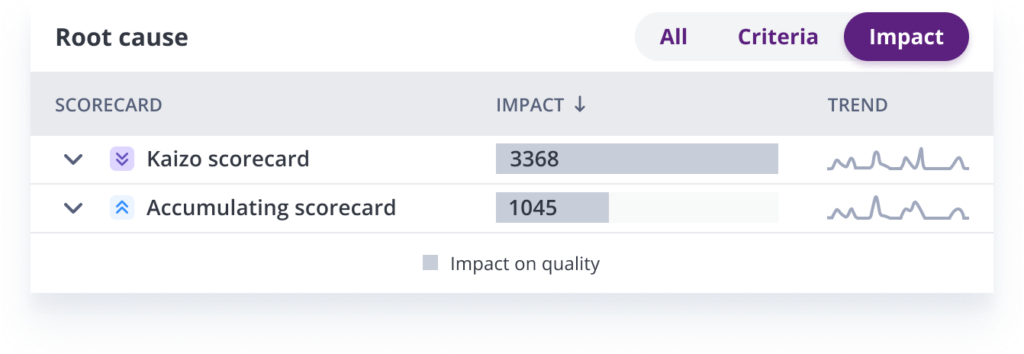
This dashboard and the Impact results help you understand the most and least impactful criteria behind agent behavior.
Depending on the focus of a QA rater, the root cause analysis can be performed from three different angles:
-
The coach can focus on the most or least impactful criteria of the scorecard, depending on their preferred setup. This shows which standards contribute the most (or least) to the agent’s final IQS.
-
Trainers can identify the criteria that were selected the most or least times. This shows how often the team complies with its quality standards.
-
You can also focus on both at once, by identifying the criteria that had the most impact on IQS or that were selected most often during ticket QA ratings.
A trendline also helps you spot recent mistakes or past issues that are no longer happening. You can check it before your next one-on-one or coaching session to plan what you want to discuss or train an agent on.
The Root Cause Dashboard also shows how often each criterion, category and scorecard was selected during QA rating. This helps you identify recurring mistakes your agents, or an entire team, are making:
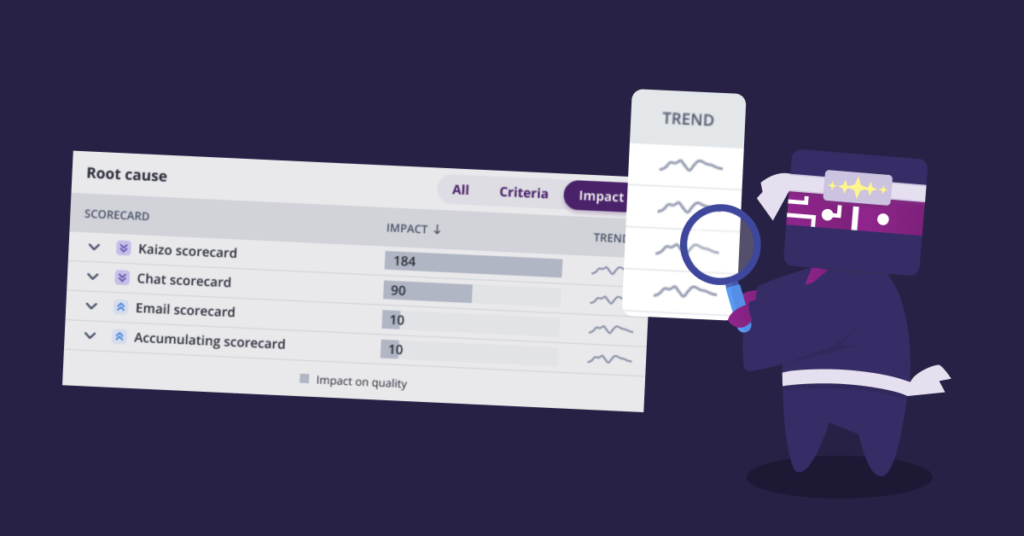
The trendline, in this case, helps you understand whether the mistake is recent or extends over a longer time.
Finally, the Root Cause Dashboard shows the exact number of checked criteria and their impact during QA rating:
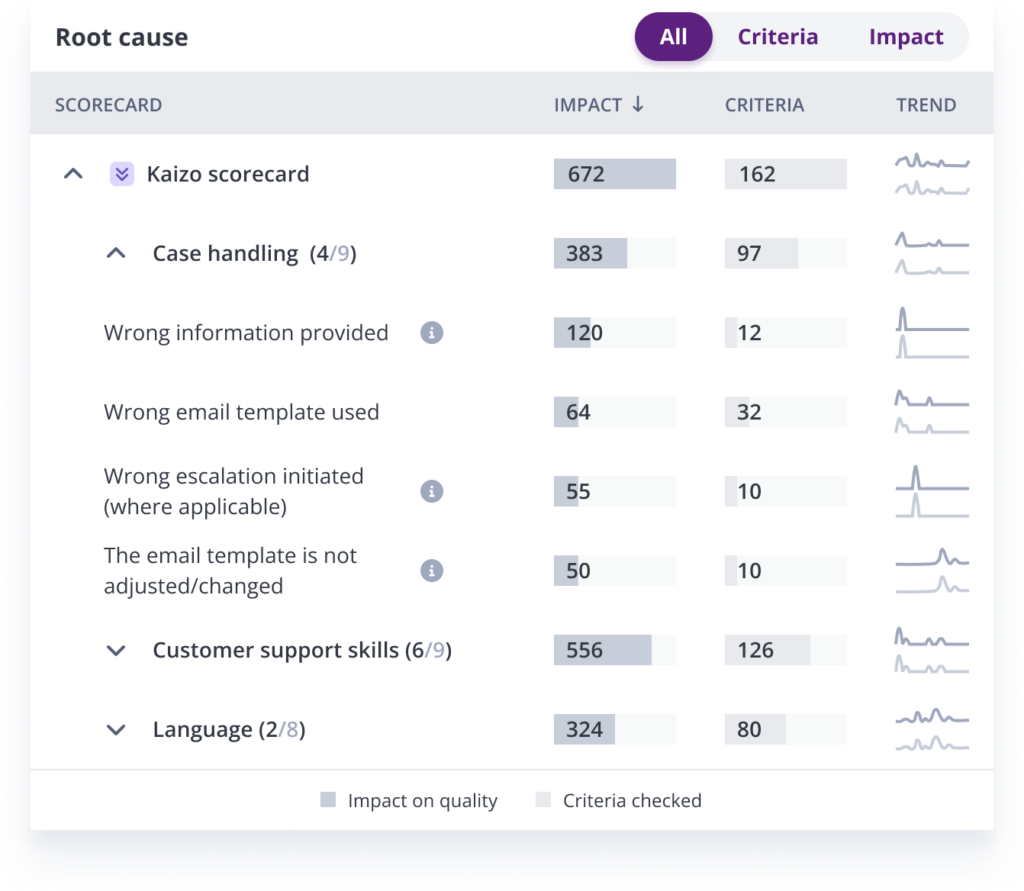
Ultimately, it’s QA and management who follow up on the outcomes of a root cause analysis to improve team performance and productivity. Team leads, the QA team or coaches decide how to improve their agents’ results and what training to schedule with each agent. Turning findings into coaching is where time is saved, as long as the evidence for each coaching conversation is gathered for you rather than by hand.
See the root causes in a live demo. Kaizo scores 100% of your support conversations and turns the findings into coaching. Let’s talk.
What other root cause analysis methods work in customer service?
The most practical root cause analysis methods for customer service are the Whys technique, fishbone diagrams (also called cause-and-effect diagrams), fault tree analysis and Pareto analysis. Each one structures your thinking and walks you through a logical process to find the cause behind poor agent results, so the fix targets the real problem rather than the most visible symptom.
| Method | How it works | Best for |
|---|---|---|
| 3 Whys or 5 Whys | Ask “why” repeatedly until you reach a cause you can change | Most support problems; quick team discussions |
| Fishbone (cause-and-effect) diagram | Sort possible causes into branches such as people, process, tools, policy and product | Problems with several possible causes at once |
| Fault tree analysis | Work backwards from the failure through the combinations of events that could cause it | Serious or compliance-critical failures |
| Pareto analysis | Rank causes by how often they occur, then fix the few that drive most failures | Choosing which problem to analyze first |
Kristina Georgiou, Head of Customer Support at Uexo, recommends using the “3 Whys” approach to root cause analysis to identify underlying issues in agent behavior.
This technique involves asking a series of “why” questions to get to the root of an issue. For example, if an agent repeatedly fails to provide complete information to help a customer, Kristina says you might start by asking:
-
Q: Why is the agent providing incomplete information?
A: Because they don’t have all the information they need.
-
Q: Why doesn’t the agent have all the information needed to successfully and quickly provide a solution to the customer’s query?
A: Because we didn’t give new agents access to a complete breakdown of that information.
-
Q: Why didn’t we provide all the information needed?
A: Because we don’t yet have a knowledge base to share with new agents from day one.
In other words, you’re answering three simple questions:
- What’s the problem?
- Why is it happening?
- What can you do to fix or prevent this from happening again?
Kristina further observes that by asking “why” three times, you can often get to the underlying cause of an issue. This can help you identify systemic issues that affect multiple agents, like a general lack of motivation or poor training resources.
She also recommends training customer support managers to use the “3 Whys” approach whenever they analyze agent results:
“Encourage managers to dig deeper to find the underlying cause of an issue, rather than just addressing the surface-level complaint. Once you’ve identified the root cause of an issue, you can take steps to address it, such as implementing new policies or procedures, updating training materials, or fixing new hire onboarding issues.”
But you don’t always have to do it manually. Software can find recurring issues and their causes across chat and email conversations for you.
Kaizo, for example, names whether a falling score comes from a broken process, product friction or a skill gap, separates systemic issues from outliers and shows the frequency and impact of each one. You can ask it questions in plain language, and skill gaps become coaching cards. See how it works on our root cause insights page.
When is root cause analysis not worth it?
Formal root cause analysis is not worth it when a problem is clearly a one-off, when you handle only a handful of tickets a week, or when you have no QA scorecard yet. Without rated conversations there is no pattern to analyze. In those cases, fix the single ticket, start scoring against a simple scorecard, and come back to RCA once you have data.
The same applies to a dashboard: if your team is small enough that one lead reads every ticket, a spreadsheet and the 3 Whys are enough. A tool earns its place when the volume of conversations is too large for anyone to spot patterns by reading.
Start your next root cause analysis from QA data
Pick the scorecard criterion that failed most last month and run the five steps above on it this week.
If the volume is too large to read, let software do the collecting and counting. To see which criteria drive your own quality scores, explore Kaizo’s customer support insights or book a meeting for a live demo with realistic sample conversations.
Frequently asked questions
What does RCA stand for in customer service?
RCA stands for root cause analysis. In customer service it means finding the underlying reason a support problem keeps happening, such as a missing knowledge base article or an unclear process, instead of only correcting the individual ticket or agent.
What is RCA in a call center?
In a call center, RCA is root cause analysis applied to calls: QA finds a pattern in scored calls and traces it to its cause. For example, if many calls fail identity verification after a phone-system update, the cause is the new call flow, not the agents, so you fix the flow and re-check the next week’s calls.
What is RCA in quality assurance?
In quality assurance, RCA is the step after scoring: you take the criteria that fail most and find out why they fail. QA scores tell you what went wrong in each conversation; RCA tells you why it keeps going wrong, so the fix becomes coaching, a process change or a product change instead of another low score.
How do you tell an agent problem from a process problem?
Look at how many agents make the same mistake. One agent repeating a mistake usually needs training or coaching. The same mistake across several agents, or across every shift, usually points to a process, policy or knowledge base gap.
Why does RCA matter more in a BPO?
In a BPO the cause often sits on the client’s side, in a policy, a product change or a knowledge base the BPO does not own. RCA gives the BPO evidence to fix the problem with the client instead of only coaching its agents.
What should you do with the results of a root cause analysis?
Turn each finding into an action. Skill gaps become training or coaching sessions, unclear processes get rewritten, and product issues go to the product team. Add the criterion to your scorecard so QA catches the problem if it comes back.