Auto QA is the use of AI to score customer support conversations against your quality scorecard, instead of reviewers grading a small sample by hand. Automated quality assurance can cover 100% of conversations, where manual QA typically reaches under 5%.
In short
- Auto QA uses AI to score conversations against your own scorecard.
- It covers every conversation, where manual sampling reaches under 5%.
- Calibration and human review are what make AI scores trustworthy.
- Roll it out on one team, then raise the automation dial.
What is automated quality assurance?
Automated quality assurance (Auto QA) is the use of AI to automatically score customer support conversations against a quality scorecard, instead of having reviewers grade a small manual sample by hand. It evaluates 100% of interactions across channels, flags the ones that need attention, and turns the results into per-agent coaching.
In a customer support or contact center context, “QA” means grading the quality of conversations: was the customer actually helped, was policy followed, was the tone empathetic, was the issue resolved on first contact. Traditionally a QA manager or team lead reads a handful of tickets per agent per week and scores them by hand against a rubric. Automated QA hands that grading to an AI engine, so every conversation is scored, consistently, at scale, and the manager’s time shifts from grading to improving.
One clarification that matters for search and for buyers: this guide is about the quality of customer conversations, not software testing. “QA” in engineering refers to testing code. In customer experience, quality assurance is a people-and-conversations discipline, and automated QA is how modern support organizations run it.
Is AI quality assurance the same as automated QA?
In customer support, mostly yes. AI quality assurance is automated QA where a language model reads and scores each conversation against your criteria, rather than keyword rules or sentiment flags doing a rough first pass.
In practice, AI quality assurance runs in two modes, and Kaizo names them separately. AutoPilot scores every conversation unattended the moment it resolves, with a comment explaining each score. Auto QA speeds up a human review: it pre-fills the mechanical criteria, such as grammar, spelling and procedural compliance, and drafts feedback for the reviewer to edit and approve. Most teams run both, the first for coverage and the second for the conversations a person needs to look at.
The evolution of QA: from sampling to autonomous scoring
Customer support QA has moved through three distinct eras, and understanding them explains why automated QA is not just a faster version of the old way, but a different model entirely.
- Era 1, manual sampling. QA lived in spreadsheets. A manager pulled a few tickets per agent, graded them against a rubric, and hoped the sample was representative. It rarely was, and scores were subjective.
- Era 2, QA software. Scorecards went digital. Calibration, dashboards and workflow made grading more consistent and auditable, but a human still graded a small sample. The ceiling on coverage stayed the same.
- Era 3, AI-assisted and then autonomous. AI now scores every conversation, and humans move up the stack to calibration, coaching and decisions. An always-on mode scores continuously with no one triggering reviews. Coverage jumps from a sample to everything.
We are now entering a fourth shift, where AI does not just grade conversations but is also handling them. That is why neutrality, covered later in this guide, is becoming the defining question when choosing an automated QA platform.
Why manual QA breaks at enterprise scale
Manual QA works fine when a team is small. It breaks the moment volume grows, and it breaks in four predictable ways:
- Coverage collapses. A reviewer can realistically grade three to five tickets per agent per week. Across a large team that is 1 to 5% of all conversations. Every decision about coaching, compliance and performance then rests on an unrepresentative sample.
- Bias creeps in. Two reviewers grade the same conversation differently, and the same reviewer grades differently on a Monday than a Friday. Agents lose trust in scores they see as subjective.
- It is reactive. Because so little is reviewed, systemic problems surface only after customers complain, not before.
- It drains senior time. QA managers and team leads can spend 10 to 20 hours a week reviewing and another chunk preparing coaching, time that does not scale and does not directly improve quality.
The hidden cost is significant. At a large support operation, the fully loaded cost of manual QA reviewers, plus the reporting time around them, can run into the millions per year, all to inspect a fraction of the work. Automated QA attacks that math directly.
Automated QA vs manual QA
The core problem automated QA solves is sampling. Scoring 100% of conversations does not just make QA faster, it changes what QA can tell you.
| Manual QA | Automated QA | |
|---|---|---|
| Coverage | Under 5% of conversations | 100% of conversations |
| Consistency | Reviewer-to-reviewer bias | One consistent standard |
| Speed | Hours of manual review weekly | Scored continuously, automatically |
| Coaching input | Prepared by hand | Auto-generated from real data |
| Visibility | Anecdotes from a few tickets | True quality trend for the whole team |
| Scales by | Hiring more reviewers | Turning up automation |
Key takeaway: manual QA answers “how did these five tickets go?” Automated QA answers “how is the entire team doing, on every conversation, right now?”
How automated QA works
A modern Auto QA platform follows four steps:
- Ingest every conversation. The platform connects to your helpdesk and pulls in conversations across channels, chat, email, tickets and messaging, so nothing is out of scope.
- Define your scorecard. You build a custom, weighted scorecard once, the criteria that define a good conversation for your team, or start from a template and adapt it.
- The AI scores 100% automatically. An AI engine evaluates every conversation against the scorecard and flags the ones that need attention. With an always-on mode, such as Kaizo AutoPilot, this runs continuously in the background with no one triggering reviews.
- Coaching is generated per agent. The results become per-agent coaching, so team leads coach from insight instead of spending their week preparing it, and improvement is tracked over time.
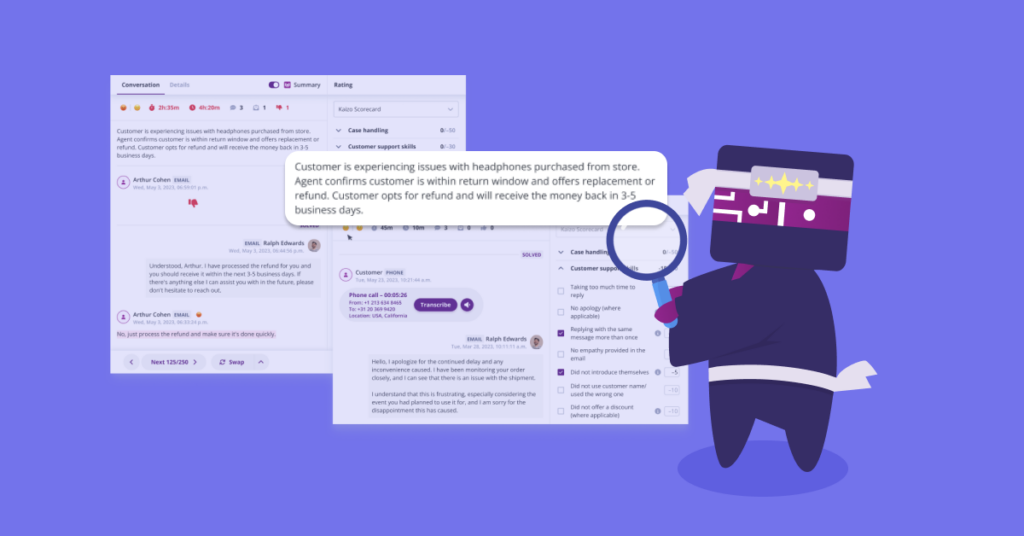
A useful concept here is the scorecard automation rate: the share of conversations scored without a human grading them. Teams typically start with heavy human oversight and turn that dial up as trust in the AI grows, which is exactly how a rollout should work (more on that below).
What automated QA actually evaluates
An Auto QA scorecard usually blends several categories. Common criteria include:
- Resolution and accuracy: was the customer’s issue actually solved, and was the information correct?
- Process and compliance: were required steps, disclosures or verification followed?
- Communication and tone: was the response clear, empathetic and on-brand?
- Efficiency: was the interaction handled without unnecessary back-and-forth?
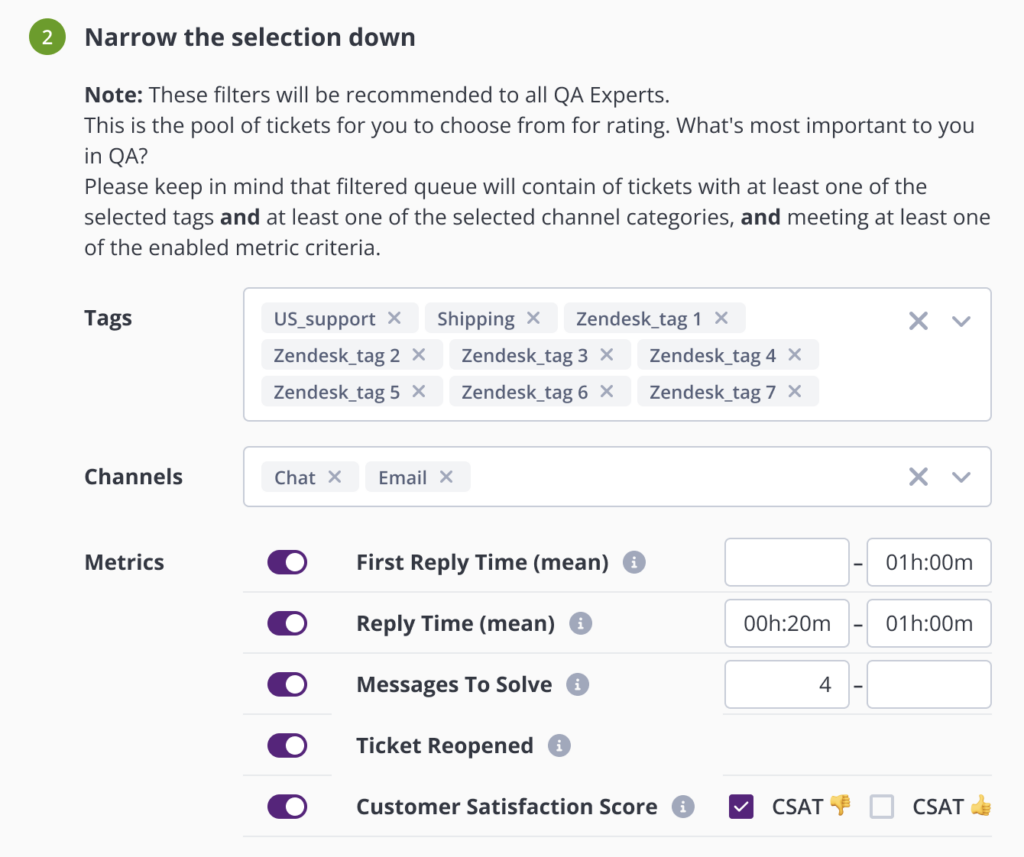
A simplified scorecard might weight those categories like this:
| Category | Example criterion | Weight |
|---|---|---|
| Resolution | Was the issue fully resolved? | 35% |
| Compliance | Were required steps and disclosures followed? | 25% |
| Communication | Clear, empathetic, on-brand tone | 25% |
| Efficiency | Handled without unnecessary back-and-forth | 15% |
Weights should reflect what your team actually cares about. A compliance-heavy fintech will weight process far higher than a growth-stage SaaS focused on speed and tone.
The most advanced automated QA goes beyond grading what was said to checking what was done. Rather than only matching keywords or sentiment, the engine can verify whether the promised action actually happened. That distinction, evaluating outcomes rather than phrasing, is what separates genuinely useful automated QA from surface-level scoring.
The benefits of automated QA, and the ROI
- Total coverage. Quality is measured on the whole team, so nothing systematic slips through.
- Consistency and less bias. One standard applied the same way to every conversation removes reviewer variance and rebuilds agent trust in scores.
- Coaching that runs itself. Auto-generated coaching cuts preparation time dramatically and ties coaching to measurable impact.
- Lower QA cost per conversation. Teams scale quality without scaling reviewer headcount, which is where the ROI comes from.
The business case is straightforward for an economic buyer: if manual QA covers 3% of conversations with a team of reviewers, automating scoring lets you cover 100% while redeploying most of that reviewer time. These are not hypothetical results, they are what teams see in production:
100%of QA automated at UiPath, with 200% ROI and +8% quality score per quarter
75%less coaching-prep time at EverHelp, with 33% scorecard automation across 16 domains
100%of conversations scored automatically, versus the under-5% manual-sampling average
Payback is typically measured in weeks, not quarters, because the reviewer-time savings and coaching-efficiency gains start the moment coverage jumps from a sample to everything.
What automated QA looks like in practice
Consider two real deployments. UiPath, a large enterprise support operation, automated close to 100% of its QA. The result was 100% of QA automated, 200% ROI, and a quality score climbing around 8% per quarter, because the team stopped spending its week grading and started acting on complete data. EverHelp, an outsourcer running support across 16 domains, reached a 33% scorecard automation rate and cut coaching-preparation time by 75%, freeing team leads to coach more people, more often.
The pattern in both is identical: coverage goes from a sample to everything, senior time shifts from inspection to improvement, and quality rises because coaching is finally based on the full picture rather than a handful of tickets. Note what does not happen, the QA team does not disappear. Its work changes. Reviewers become calibrators and coaches, the higher-value roles that manual grading never left time for.
Building the business case for automated QA
Getting budget for automated QA usually means speaking to three audiences at once, and the strongest case addresses all three:
- The Head of QA cares about coverage and bias, moving from under 5% to 100% and removing reviewer-to-reviewer inconsistency.
- The Head of Support or Operations cares about ROI and time, reviewer hours reclaimed, faster reporting, and a payback measured in weeks.
- Team leads care about coaching, less prep, more time with agents, and impact they can actually see.
Combine a hard cost saving from reclaimed reviewer time with a quality and CSAT gain from coaching on complete data. Frame the pilot around a single team so the before-and-after is easy to measure, then extrapolate the reclaimed hours and score improvement across the wider organization to size the full opportunity.
Is automated QA accurate? How to trust the scores
The number one question QA leaders ask is whether they can trust an AI score. The answer is to treat human oversight as a design choice, not a gap. A trustworthy Auto QA program relies on a hierarchy of feedback signals:
- Calibration sessions align the AI with your team’s standards and are the highest-trust signal in the system.
- Reviewer corrections at scale mean that every time a human overrides a score, future scoring improves.
- Rate-the-rater checks keep both human and AI grading honest.
- External validation ties QA scores to CSAT, so you can confirm higher scores track happier customers, not just internal opinion.
The quiet accuracy factor: neutrality. A QA vendor that also sells its own AI support agents has an incentive to make those agents look good. A platform that does not sell agents can grade every conversation, human or AI, without that conflict of interest. When accuracy is the whole point, neutrality is not a nice-to-have.
You also stay in control. The automation dial means you decide how much is scored without a human in the loop, starting conservative and increasing autonomy only as confidence grows.
How to roll out automated QA
A successful rollout is incremental, not big-bang:
- Start with a pilot team. Pick one team or queue, connect the helpdesk, and let the AI score in parallel with your existing manual process.
- Codify your scorecard. Translate your current rubric into a weighted scorecard. This is also a good moment to remove criteria that never actually drove outcomes.
- Calibrate. Run calibration sessions comparing AI scores to trusted human scores, and adjust until they align.
- Turn up the automation dial. As calibration holds, increase the share of conversations scored automatically and shift reviewers from grading to coaching.
- Close the loop with coaching. Route findings into per-agent coaching and track impact at 30, 60 and 90 days.
Common automated QA mistakes to avoid
- Treating it as “manual QA plus a little AI.” Bolting an AI assist onto sampling misses the point. The value is in 100% coverage.
- Over-stuffing the scorecard. Too many criteria dilute signal. Score what actually predicts customer outcomes.
- Skipping calibration. Without calibration, teams either over-trust or under-trust the AI. Calibration is what earns the automation dial.
- Scoring without coaching. Scores that do not turn into coaching do not change behavior. Close the loop.
- Choosing a conflicted vendor. A platform that grades its own AI agents cannot do so impartially.
Automated QA metrics to track
Once you are scoring everything, watch these:
- Quality score trend across the whole team, not a sample.
- Scorecard automation rate, the share scored without human grading, as a measure of maturity.
- QA-to-CSAT correlation, to prove scores reflect real customer experience.
- Coaching impact, score movement per agent at 30, 60 and 90 days.
- QA cost per conversation and reviewer hours saved, for the ROI story.
How automated QA improves your core support metrics
Automated QA is not a reporting exercise, it moves the numbers leaders are measured on:
- CSAT. Scoring every conversation surfaces the specific behaviors that correlate with satisfaction, so coaching targets what actually moves the score.
- First contact resolution. Complete coverage exposes the resolution gaps a small sample would miss, from skipped steps to incorrect information.
- Agent ramp time. New agents get coached from real conversations immediately, shortening the path to full productivity.
- Consistency across teams and sites. One standard applied everywhere keeps quality even across in-house teams, remote agents and BPO partners.
Because the scores tie back to CSAT, you can prove the connection between quality work and customer outcomes rather than simply asserting it, which is exactly the evidence leadership wants before investing further.
Automated QA vs conversation intelligence vs speech analytics
These three terms are often used interchangeably, but they are not the same thing, and knowing the difference helps you buy the right tool.
- Speech analytics originated in voice contact centers. It transcribes calls and analyzes them for keywords, sentiment and talk patterns. It is strong on voice, and historically weaker on digital channels.
- Conversation intelligence is broader. It analyzes conversations across channels to surface trends, contact drivers and insights, answering “what is happening across all our conversations?”
- Automated QA is the one tied to a quality standard. It scores each conversation against your scorecard and drives agent coaching, answering “how good was this conversation, and how do we improve it?”
They overlap, and the strongest modern platforms combine automated QA scoring with conversation-level insight so quality data and business insight come from the same source. If your goal is measuring and improving agent quality at scale, automated QA is the category to anchor on.
Automated QA by team type
The value of 100% coverage shows up differently depending on the operation:
- BPOs and outsourcers. Standardize quality across many clients with unified evaluations, and prove SLA adherence with evidence from every conversation rather than a sample.
- High-growth SaaS support. Keep quality steady while headcount scales fast, and shorten new-agent ramp by coaching from real conversations from day one.
- Fintech and regulated industries. Get compliance coverage on 100% of interactions, not 3%, with a consistent, auditable standard applied to every conversation.
- Ecommerce and retail. Protect CSAT through seasonal volume spikes, when manual QA coverage would otherwise collapse under peak load.
Signs your team is ready for automated QA
You are likely ready to move if several of these are true:
- Your reviewers can only reach a small percentage of conversations, and you suspect the sample is not representative.
- Agents push back on scores as subjective or inconsistent between reviewers.
- Your QA managers or team leads spend hours each week grading and preparing coaching by hand.
- You are scaling headcount and QA cannot keep pace without hiring more reviewers.
- You operate across multiple teams, sites or BPO partners and struggle to apply one standard.
- AI is starting to handle some of your conversations and you have no consistent way to grade them.
If three or more of these resonate, manual QA is already the bottleneck, and automation is the way past it.
What to look for in an automated QA tool
- True 100% coverage with an always-on mode, not an AI bolt-on to manual sampling.
- Custom, weighted scorecards that match how your team defines quality.
- Automatic, per-agent coaching with impact tracked over time.
- Platform-agnostic integrations so it sits on your existing stack (Zendesk, Salesforce and others) rather than locking you in.
- Fast time to value, live in days rather than a months-long build.
- Neutrality, so it can credibly grade AI-handled conversations as AI takes on more volume.
Kaizo is built on exactly these principles. See how Kaizo’s automated QA works, explore AI coaching, or compare customer service QA software.
Automated QA and AI agents
As AI starts handling more support volume, someone has to grade those AI conversations too. This is where automated QA becomes strategic rather than operational: the same scorecard and the same engine can evaluate human and AI conversations side by side, on one standard. The catch is neutrality. Only a platform that does not sell its own AI agents can grade them impartially. That makes a neutral Auto QA foundation a safer long-term bet than a tool expanding into the very agents it would then need to score. For teams where AI already handles a meaningful share of volume, this is quickly becoming the deciding factor.
There is a second reason this matters. When AI handles a conversation badly, you need to know before the customer churns, not after. Automated QA that covers 100% of AI and human interactions becomes an early-warning system for AI quality, catching regressions the moment an automated flow starts giving wrong answers or missing edge cases. A sampling approach cannot do this, because the failing conversations are statistically unlikely to be in the sample. As the mix of human and AI shifts, the argument for complete, neutral coverage only gets stronger.
The bottom line
Automated quality assurance is the shift from inspecting a fraction of your customer conversations to understanding all of them. It replaces a biased sample with complete coverage, reviewer subjectivity with a consistent standard, and hand-prepared coaching with insight generated automatically. The teams getting the most from it treat it as a program, not a feature: they codify a focused scorecard, calibrate carefully, turn up automation as trust grows, and route every finding into coaching they can measure.
The organizations that win the next few years will be the ones that can measure and improve quality across both human and AI conversations, on one neutral standard, without adding headcount. That is what automated QA makes possible, and it is why it has moved from a nice-to-have to the backbone of modern customer support quality.
Frequently asked questions
What is Auto QA?
Auto QA is automated quality assurance: using AI to score 100% of customer support conversations against a scorecard, instead of manually reviewing a small sample.
How is automated QA different from manual QA?
Manual QA grades under 5% of conversations by hand; automated QA scores every conversation consistently and turns the results into coaching, so quality reflects the whole team rather than an anecdote.
Is automated QA accurate?
Yes, when it is designed with human oversight: calibration sessions, reviewer corrections that improve the model, CSAT correlation as external validation, and an automation dial you control.
How long does it take to set up automated QA?
With a modern platform, scoring can begin within days of connecting your helpdesk, then you calibrate and increase automation over the following weeks.
What channels can automated QA score?
Digital-first platforms score conversations across chat, email, tickets and messaging.
Does automated QA replace QA managers?
No. It removes the manual grading so QA managers and team leads spend their time on calibration, coaching and improvement, the work that actually raises quality.
Can automated QA evaluate AI agents and chatbots?
Yes. A neutral platform that does not sell its own AI agents can grade AI-handled conversations without a conflict of interest, which matters more as AI handles more volume.
What is a good scorecard automation rate?
There is no single number. Teams start low with heavy human oversight and raise it as calibration proves the AI is aligned. The rate is a maturity measure, not a target to rush.
Does automated QA work for BPOs?
Yes. BPOs use it to standardize quality across multiple clients with unified evaluations, and to prove SLA adherence with evidence from every conversation rather than a sample.
How is automated QA different from conversation intelligence?
Conversation intelligence surfaces trends and insights across conversations; automated QA scores each conversation against a quality standard and drives coaching. The strongest platforms do both from the same data.
What does automated QA cost?
Pricing is usually value-based and scales with volume. The relevant comparison is against the fully loaded cost of manual reviewers, since automation typically pays back within weeks.
Can automated QA handle multiple languages?
Modern platforms score conversations in many languages, which matters for global and BPO operations running support across regions.